See the supervision in pictures

No edited video, no redrawn mock-up: the screens exactly as they come out, photographed on 6 August 2026 on a demonstration school. You look, you fill nothing in, and nothing leaves from here.

Where these pictures come from — They are taken on an invented school: the name, the pupils, the instructors, the vehicles and the amounts do not exist. No real pupil file appears on this page. The date is written under each picture, because an undated screenshot always ends up showing a screen that no longer exists.

The day, every instructor side by side

A single day's schedule: one column per instructor, lessons placed at their time, with the office and the vehicle.

Drag the picture sideways to read the detail.

A single day's schedule One column per instructor, the number of events at the head of the column, and each lesson with the office it belongs to and the vehicle taking it. The day, week and month views sit on the same page; the filters work on the office and on the instructor. The key tells apart lesson, test, mock test, assessment, unavailability, lunch break, office, meeting and theory session. Screenshot of 6 August 2026

The pupil list starts with what is wrong

Pupil list: a banner sets out the points needing attention, an overdue training package or an enrolment request to handle, before the list itself.

Drag the picture sideways to read the detail.

The points needing attention, before the list The page does not open on a table to be sorted: it opens on what needs a decision today — the training packages that have run out or are about to, and the enrolment requests waiting for an answer. Each point leads straight to the line it concerns. Screenshot of 6 August 2026

The school's figures, without a spreadsheet
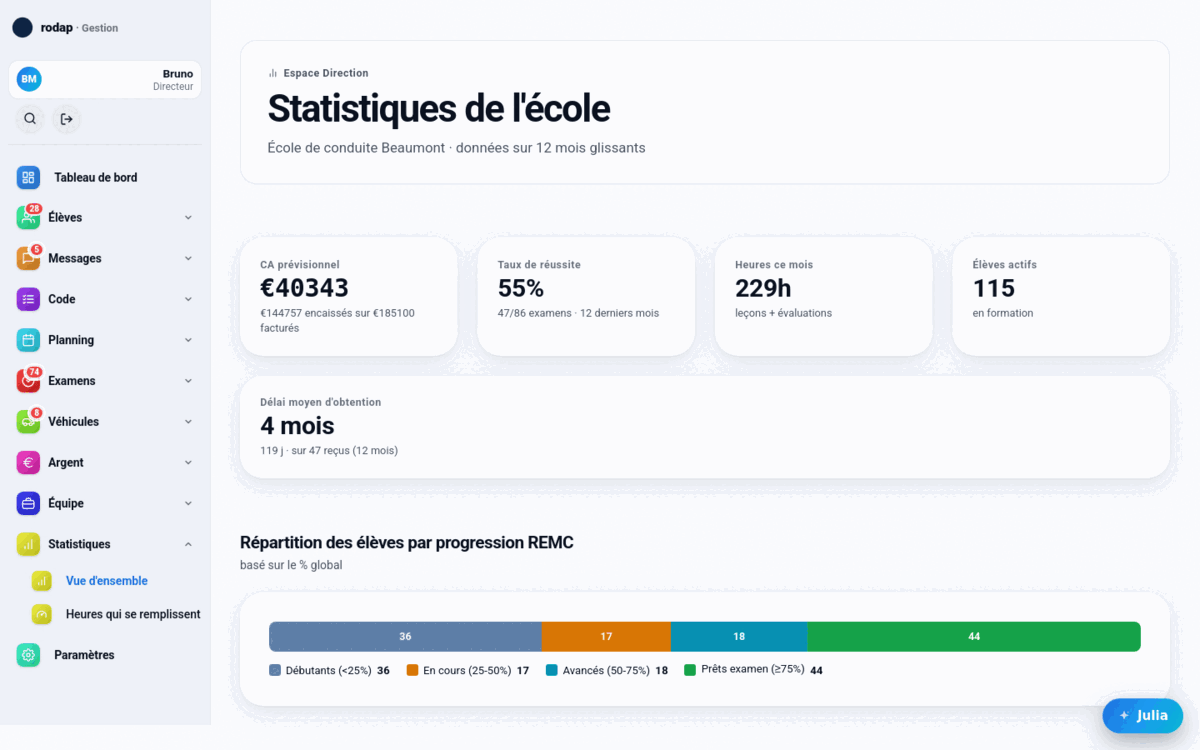
School statistics: amount still to collect, pass rate, hours in the month, active pupils, average time to the licence and pupils by progress.

Drag the picture sideways to read the detail.

What the school knows about itself The amount still to collect on current contracts, the pass rate worked out over the last twelve months with the number of tests behind it, the month's hours, the pupils in training, the average time between enrolment and the licence, and how the pupils are spread across their progress through the official syllabus. Every figure shows what it is worked out on. Screenshot of 6 August 2026

What three pictures will never show

The supervision rests on more than two hundred and sixty screens. Three screenshots show three of them: the schedule, the pupils, the figures. That leaves the contracts, the tests, the payroll, the registers, the highway code, the vehicles, the messaging, the documents — and everything that cannot be photographed, such as the fact that something entered in one place is never entered again anywhere else.

A demonstration claiming to show everything would show nothing. This one shows little, and says so.

And what does the pupil see?

Not the same thing, and that is deliberate: the pupil has a space of their own, with screens of their own. The page written for them shows those too, in dated pictures.

Run a calculation on your own figures

Pictures are there to be looked at; a figure is there to be checked. The demonstration page runs the break-even calculation inside your own browser, with your own costs. Nothing is sent, nothing is recorded.

The rest is seen from the inside

These screens are not something you subscribe to: they are part of the interface I make available for the length of the assignment. Your data comes back out in open formats whenever you want, at no cost and with no permission to ask for.